
One problem many Mac users have been noticing lately is the bug Mac OS X 10.5 that does not include attachments when you save Mail messages as RTF. Thanks to Andreas Amann, this bug can be easily remedied with his AppleScript package for Mac OS X Mail. Here is how to export a message to RTF and include attachments:
- First download the AppleScripts from Amann’s site.
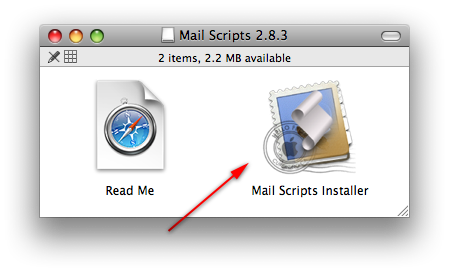
- To install it, just double click on “MailScripts Installer” in the MailScripts.dmg.
- Next, go to Mac OS X Mail and locate the messages you want to export.
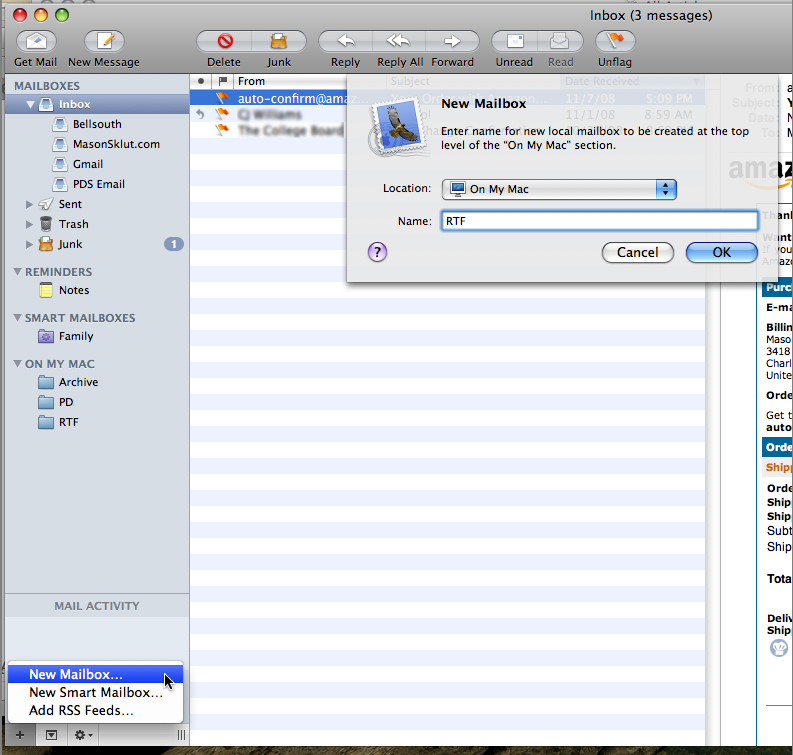
- If you want to export specific messages instead of all of them, make a mailbox called “RTF”
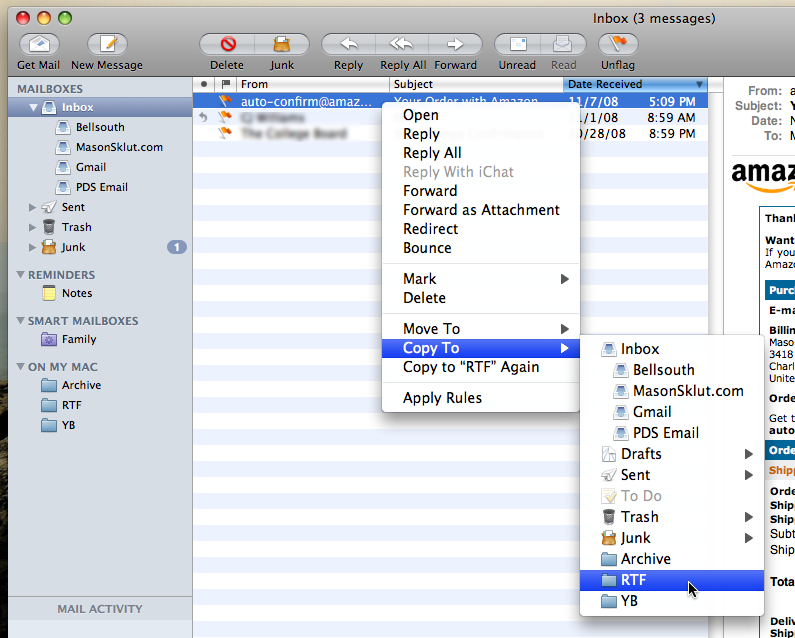
- Right-click on the messages you want to export and choose “Copy To” > RTF.
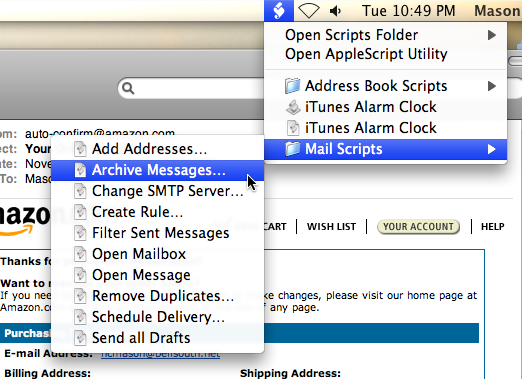
- In the menubar look for the AppleScript icon next to the Volume icon.
- In list of AppleScripts that appear, all we care about is “Mail Scripts”.
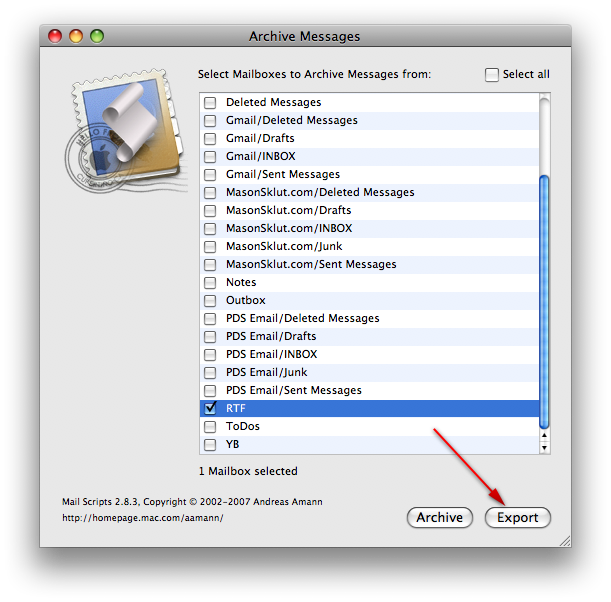
- Inside of “Mail Scripts”, choose “Archive Messages…”.
- Now, select the mailbox RTF.
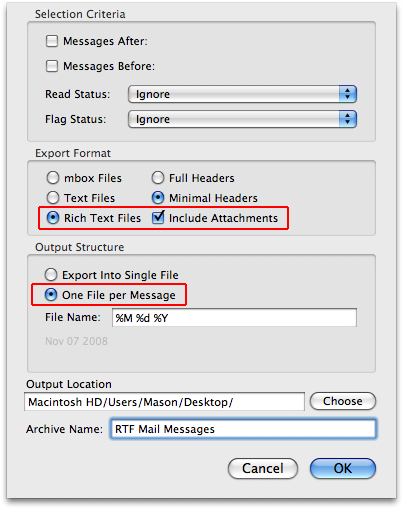
- In the “Selection Criteria” window, make sure you pick “Rich Text Format” and “Include Attachments” under “Export Format”.
- After making any other changes, click OK and the mail message will appear on your Desktop (or elsewhere depending on where you chose to export it) in RTF format with all attachments included.
- Once you’re finished exporting, you may want to remove the messages (which are copies of the originals, so they’re safe to delete) from the RTF mailbox so they won’t get exported again for the next time.
Herman
Jan. 15, 2011Hey, thanks for this, that saved a lot of time.
Mason Sklut
Jan. 15, 2011Thanks Herman!
Moris
Mar. 18, 2011And how can I export the rss messages (with images)?
SN
Apr. 4, 2011Thanks for the tip. I didn’t realize that the Archive script also included an Export to RTF option. A big time saver!
Mason Sklut
Apr. 4, 2011Glad you found the tip helpful!
Michelle
Aug. 25, 2011Hi, I *think* I’ve followed all the steps, and the export file appears on my desktop, but I can’t seem to open it with anything (says it’s in the wrong format)…thoughts? Thanks!
Mason Sklut
Aug. 25, 2011Michelle, that’s strange…. What format is your file?
Michelle
Aug. 26, 2011It’s saying .rtfd (and then I did it without attachments so it was .rtf), so the format seems right. Maybe it’s somehow corrupted? Not sure. I tried to open with both OpenOffice and Text Editor, and each gave me an error — also tried using different file names. I’m on 10.6.8 if that makes a difference? Thanks for your reply :)
Michelle
Aug. 26, 2011FYI this is the message from Text Editor below the statement that the file isn’t in the correct format: “The file might be corrupted, truncated, or in an unexpected format.” In OpenOffice, it’s this: “Read-error. File format error found at 250844,3(row,col).
Michelle
Aug. 26, 2011Me again — please don’t worry about this; I’ve decided to just import everything to Gmail via IMAP for now as I won’t need these messages forever, just in time before I have to close the email account associated with my Mac Mail. Thanks again for your attention :)
Mason Sklut
Aug. 26, 2011Michelle, I am sorry that I couldn’t come up with a solution for you on the exported files… Let me know if you need help with anything else on your Mac and I’ll be glad to help.
Best,
Mason
Jason Ferris
Jan. 10, 2012Thanks for the great article! It saved me a ton of time. FYI, I also needed to go the other way–exporting email from my PC to my Mac with attachments, and keeping the same formatting as much as possible (I had over 7000 work emails in Outlook). I used 8Convert (www.eighthoof.com) and it worked. Between that and your solution I’ve got both directions covered. ;) Thanks again!